
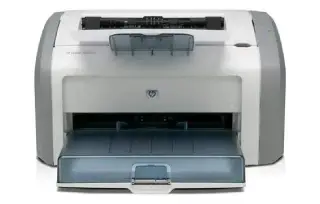
Overview
The HL-L2350DW is the printer people buy when they are tired of inkjets. It does one job — black-and-white documents — and it does it quickly, cheaply and without drying out between uses. Automatic duplex and Wi-Fi at this size and price is the combination that has kept it on recommendation lists for years.
There is no scanner and no Ethernet port. If you need to scan or copy, the MFC-L2710DW is the same engine with a flatbed and feeder bolted on. Toner is the other reason to like it: the high-yield TN-760 keeps the running cost per page well under what any home inkjet manages.
Key specifications
- Type: Monochrome laser, print only
- Print speed: Up to 32 ppm (letter)
- Resolution: Up to 2400 x 600 dpi
- Paper handling: 250-sheet tray, manual feed slot
- Two-sided printing: Automatic
- Connectivity: Wi-Fi, Wi-Fi Direct, Hi-Speed USB 2.0
- Wired network: Not included — Wi-Fi and USB only
- Toner: Brother TN-730 / TN-760
Specifications vary by region and revision. Check the model number printed on the front of the machine before ordering consumables or parts.
Features at a glance
- Prints up to 32 pages per minute
- Automatic two-sided printing
- Wireless and mobile printing support
- 250-sheet paper tray
- Small enough for a desk or shelf
Who the Brother HL-L2350DW is for
Students, home offices and anyone who prints text documents in bursts and wants zero maintenance between jobs.
Common problems and how to fix them
Wireless setup fails or the printer will not join the network
This model uses the 2.4 GHz band only. If your router merges 2.4 and 5 GHz under one name, separate them temporarily and run setup again. The WPS button method on the printer's control panel is usually the quickest route once the right band is available.
Toner low warning appears while pages still look fine
Brother's counter is conservative. Remove the drum and toner assembly, rock it gently side to side and reinstall — that often clears the message for a while. There is also a continue mode in the settings menu that lets you keep printing past the first warning until quality actually drops.
Pages come out with grey background or repeated marks
Repeating marks at even intervals point at the drum unit, which is a separate consumable from the toner and lasts roughly three toner cartridges. A general grey haze usually means the corona wire needs cleaning — slide the green tab on the drum back and forth a few times, then return it to its home position.
Frequently asked questions
Does the Brother HL-L2350DW scan or copy?
No, it is print-only. The MFC-L2710DW is the all-in-one version of the same printer.
Does it have an Ethernet port?
No. It connects over Wi-Fi or USB. The HL-L2370DW adds wired Ethernet.
How long does the toner last?
Around 1,200 pages with the standard TN-730 and roughly 3,000 with the high-yield TN-760, based on the ISO 5% coverage standard.
Still stuck?
Our technicians work with Brother every day. Call +1-8887342713 any time, or send us the details and we will get back to you.